Maths14 min readUpdated May 7, 2026

Best Voice Calculators in 2026: Online Tools and Mobile Apps Compared

The Calculory Team

Calculator and Productivity Tools Analysts

The best voice calculators of 2026 compared: web tools, iPhone and Android apps, talking calculators, and PC options. Find the right voice activated calculator.

Best Voice Calculators in 2026: Online Tools and Mobile Apps Compared

Key Takeaways

  • Browser-based voice calculators run instantly with no install. The Web Speech API powers them in Chrome, Edge, and Safari, covering roughly 75% of global desktop and mobile traffic in 2026.
  • Apple Siri and Google Assistant both handle voice math natively across iPhone, Android, Mac, and Chromebook. Recent devices (iPhone 12 and newer, Pixel 6 and newer) handle basic arithmetic on-device.
  • Dedicated voice calculator apps on the App Store and Google Play typically range from free with ads to $4.99 one-time. Most cover the same features as a browser tab without the install step.
  • Calculory's free web-based Voice Calculator handles both directions of speech, recognition for input and synthesis for read-back, with operator precedence and locally stored history.
  • Privacy varies sharply. Browser tools process speech in the OS or browser layer. Dedicated apps and assistants range from fully on-device to fully cloud-based depending on the platform.
  • Accessibility users benefit most from tools that combine voice input AND voice output. Many apps marketed as voice calculators only do input, leaving low-vision users without spoken results.

What is a voice calculator in 2026

A voice calculator is any tool that lets you say a math equation out loud and receive the answer, either on screen, spoken back, or both. It is the fastest way to do math when your hands are busy or when typing on a small keypad is awkward. In 2026, four distinct categories cover this need, and they differ sharply in setup time, privacy, and cost.

The four types of voice calculator

TypeWhere it livesSetup timeTypical cost
Browser-basedAny web tab, including Calculory's Voice Calculator0 seconds (open URL)Free
System voice assistantSiri, Google Assistant, Alexa, CortanaAlready installedFree
Dedicated appApp Store, Google Play, Microsoft Store30 to 60 seconds (download)Free with ads to $4.99
AI math solverChatGPT voice mode, Gemini, Claude appsAccount requiredFree tier or $20 per month

This guide compares the strongest free options in each category and helps you pick based on your device, privacy needs, and how often you dictate math. We start with the fastest path (a browser tab), then walk through phone assistants, dedicated apps, and desktop options.

Quick check: Most readers can stop here and use Calculory's free Voice Calculator, which works on every modern browser, reads the answer aloud, and saves history locally. Read on for the deeper comparison.
Best browser-based voice calculators (online, no install)

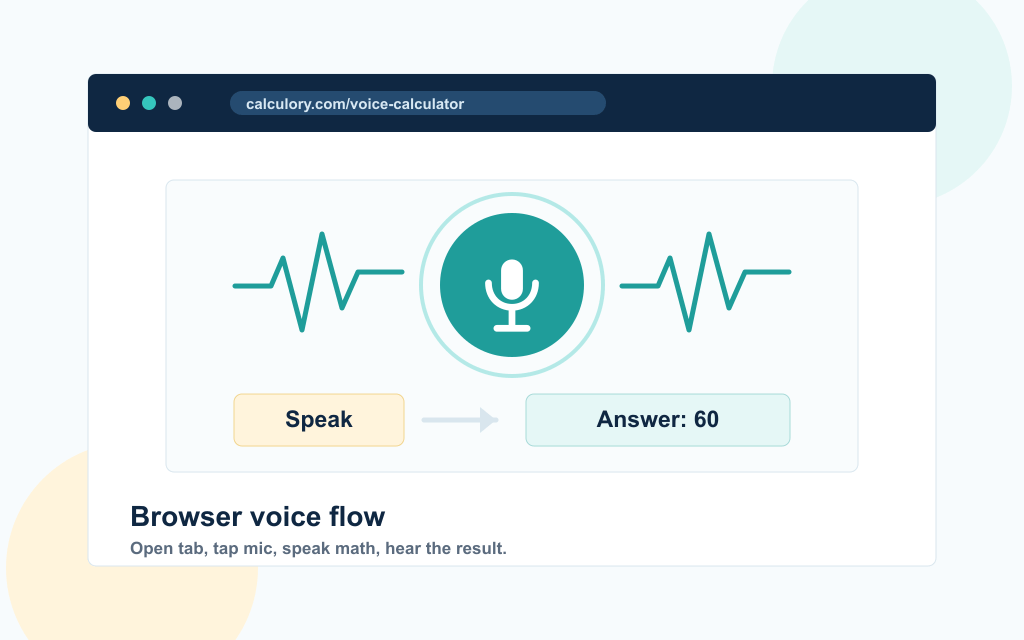
A simple browser voice calculator flow showing a microphone input, sound wave, and answer card reading 60.

A browser-based voice calculator is the fastest path to dictating math. You open a URL, tap a microphone icon, and speak. There is no app to install, no account, and no platform lock-in. The same page works on Windows, macOS, Linux, ChromeOS, iPhone, iPad, and Android tablets, as long as the browser supports the Web Speech API.

Browser-based options compared

ToolVoice inputRead-back (TTS)HistoryCost
Calculory Voice CalculatorYesYes (toggle)Local, 20 entriesFree
Generic web voice calculatorsYesSometimesOften noneFree with ads
Calculator with manual typing onlyNoNoVariesFree

The key advantage of a browser tool is the zero-friction start. You can be calculating within five seconds of clicking a search result. The trade-off is that you need a microphone and a supported browser, and the speech recognition runs through whatever cloud or on-device service the browser routes to.

Why Calculory's voice calculator stands out

Calculory's Voice Calculator was built specifically to cover the long tail of spoken math, not just basic arithmetic. It handles:

  • Operator precedence ("two plus three times four" returns 14, not 20)
  • Multi-word numbers ("one hundred twelve" returns 112)
  • Decimals via "point" or "dot" ("three point one four" returns 3.14)
  • Percentages ("twenty percent of two hundred" returns 40)
  • Functions like square root, squared, cubed, and "to the power of"
  • Read-back of every result through your browser's text-to-speech engine

It also auto-balances parentheses, strips question filler like "what is" and "calculate", and falls back to a typed input box for browsers without speech support (notably Firefox in default builds).

Try it: Open the Voice Calculator, allow microphone access, and say something like "square root of one hundred forty four" to hear it return 12. For non-voice calculation, the Basic Online Calculator and Scientific Calculator cover the same operations with a tap-to-enter keypad.

Voice math through Siri (iPhone, iPad, Mac)

Siri is the easiest voice calculator on Apple devices because it is already on every iPhone, iPad, and modern Mac. You activate it with "Hey Siri" or by holding the side button, then speak your equation. Siri parses the math, displays the result, and reads it aloud. No app to install, no permissions to grant beyond the system-level microphone access you already approved at setup.

What Siri handles well

CapabilityExampleResult
Basic arithmetic"Hey Siri, what is twelve times five?"60
Decimals"What is twelve point five plus seven?"19.5
Percentages"What is twenty percent of two hundred?"40
Unit conversion"How many kilometers in fifty miles?"80.47 km
Currency conversion"Convert one hundred USD to EUR"Live rate

Where Siri falls short

Siri does not keep a running calculation history you can scroll through. Each query is independent: you cannot say "now multiply that by 3" and have it remember the previous answer reliably across sessions. Siri also does not display the parsed expression on screen the same way a dedicated calculator does, so if you misspoke, you may not catch the error before the result appears.

For accessibility, Siri does read results aloud automatically, which makes it strong for low-vision users. Combined with VoiceOver, it can replace a dedicated Basic Online Calculator for daily arithmetic on Apple devices.

If you live in the Apple ecosystem and only need quick arithmetic, Siri is your fastest option. For chained calculations, multi-step problems, or anything that benefits from seeing the parsed expression, switch to a browser-based voice calculator with on-screen feedback.

Voice math through Google Assistant (Android, Chromebook, smart displays)

Google Assistant covers the Android side of the world the same way Siri covers Apple. It runs on every Pixel, every recent Samsung Galaxy, every Chromebook, and every Google smart display or smart speaker. You trigger it with "Hey Google" or a long-press of the home button, then speak the math.

Google Assistant math examples

PhraseResultRead aloud?
"Hey Google, what is twelve times five?"60Yes
"What is the square root of one hundred forty four?"12Yes
"What is fifteen percent of eighty?"12Yes
"Calculate one fifth plus two thirds"0.866 (decimal answer)Yes
"What is two to the power of ten?"1024Yes

Google Assistant runs entirely on-device for these queries on Pixel 6 and newer phones, which means no network round-trip and no audio leaving the device. On older Android devices and on Chromebooks, the audio is sent to Google's servers and processed in the cloud, similar to how Siri handles older iPhones.

Where Google Assistant differs from Siri

The main practical difference is fraction handling. Google Assistant returns decimal results for fraction phrases ("one fifth plus two thirds" gives 0.866), while a dedicated Fraction Calculator returns the exact fractional result (13/15). For students or anyone who needs to keep work in fractional form, Google Assistant is not the right tool. It is excellent for everyday arithmetic but weak for symbolic math.

Like Siri, Google Assistant has no scrollable calculation history and limited follow-up context. For continuous dictation across multiple problems, a browser tab beats both assistants because the page maintains a visible record of every calculation.

Talking calculators and calculators with speakers

Before browser-based voice calculators existed, the only way to hear a math result spoken aloud was a physical talking calculator. These handheld units have a built-in speaker that reads out every key press and every result. They have been manufactured continuously since the late 1970s, originally for blind and low-vision students, and they still serve that market in 2026.

Two meanings of 'calculator with speaker'

TypeWhat it isTypical priceWhen it wins
Physical talking calculatorHandheld unit with chip-level speech engine and built-in speaker$15 to $60 USDClassrooms with no internet, accessibility settings, no-microphone environments
Web calculator with speaker outputBrowser tool that reads results through your device speakers using text to speechFreeAnywhere with a modern browser, including phones, laptops, tablets
Smart speaker doing mathAlexa, Google Home, or HomePod handling spoken arithmetic$30 to $100 (hardware)Kitchens, workshops, hands-busy work where no screen is needed

How web tools replaced most physical talking calculators

For sighted users, browser-based voice calculators have largely absorbed the handheld talking-calculator market. A web tab open to Calculory's Voice Calculator gives you the same audio read-back as a $40 dedicated unit, plus a visible result on screen, a scrollable history, and free updates. The physical category retains real value in three cases:

  1. 1.Classrooms with no reliable Wi-Fi: Schools standardize on handheld talking calculators for testing where internet cannot be guaranteed.
  2. 2.Users with motor impairments: Large physical buttons are easier to operate than touch screens for users with limited fine motor control.
  3. 3.Privacy-critical accessibility programs: A handheld with a chip-level speech engine has no microphone, no network, and no telemetry. Some accessibility frameworks require this.

Talking calculator features worth comparing

If you are buying a physical unit, or evaluating an app that markets itself as a talking calculator, check for these features:

  • Headphone jack: Private listening matters in shared classrooms and offices.
  • Speech rate control: Slow for new users, fast for power users who skim audio.
  • Repeat-last-result button: Plays the most recent answer without recalculating.
  • Volume control: Often missing on cheaper handhelds.
  • Voice quality: Older units sound robotic; newer ones use natural-sounding speech synthesis matching what modern browsers produce.

Bottom line: If you searched for 'calculator with speaker' or 'talking calculator', a free browser-based voice calculator covers the same need for most users. Reserve the physical category for accessibility settings where a dedicated device is genuinely required.

Dedicated voice calculator apps for iPhone and Android

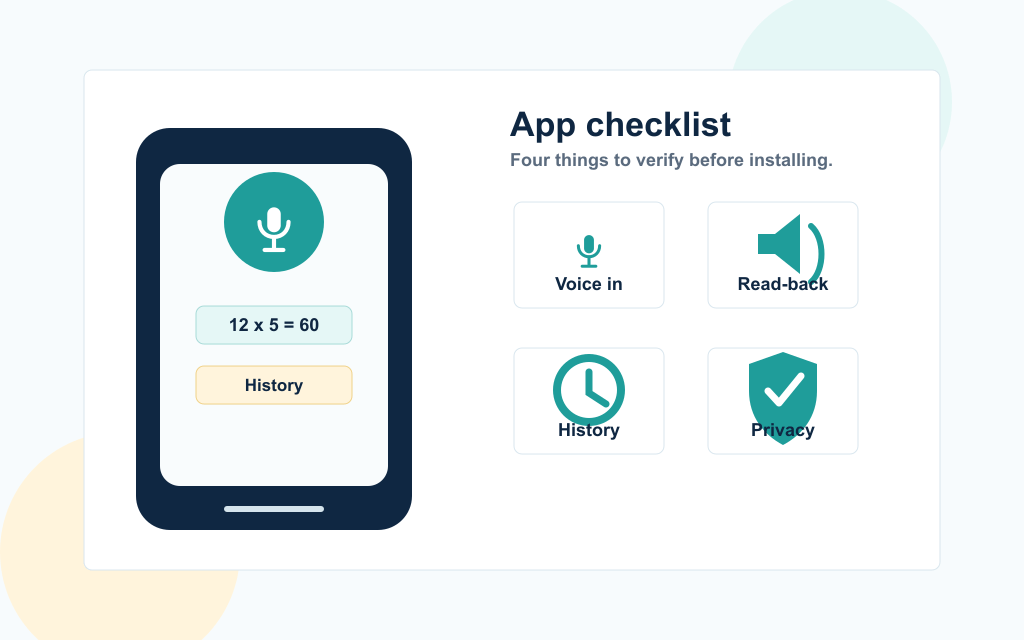
A minimal app checklist visual showing four voice calculator app criteria: voice in, read-back, history, and privacy.

Search the App Store or Google Play for "voice calculator" and you will find dozens of dedicated apps. Some are excellent, many are weak. Because anyone can publish a voice calculator app and the category has minimal regulation, you have to evaluate them carefully before installing.

What to look for in a voice calculator app

FeatureWhy it mattersCommon gap
Voice input AND read-backTrue hands-free use needs both directionsMany apps only do input
Operator precedence"Two plus three times four" should be 14, not 20Naive parsers calculate left-to-right and get 20
Calculation historyLets you reference past resultsFree apps often lock this behind a paywall
Offline modeWorks without an internet connectionMany apps require cloud speech APIs
No data collectionAudio should not be uploaded for analyticsFree apps often monetize through telemetry
Multi-language supportUseful if your primary language is not EnglishMost free apps are English-only

Pricing patterns

Most dedicated voice calculator apps follow one of three pricing models:

  1. 1.Free with banner ads: No upfront cost, ads appear above or below the calculator. Works for casual use, but the ads slow down the page on older phones.
  2. 2.Free with optional premium ($1.99 to $4.99 one-time): Removes ads, sometimes unlocks history or extra functions. Reasonable if you use the app daily.
  3. 3.Subscription ($1 to $5 per month): Usually overkill for a calculator. The same features are available in a free browser tab.

Why a browser tab often beats a dedicated app

If you only dictate math occasionally, a browser-based Voice Calculator gives you the same core functionality without the install, the storage cost, the update cycle, or the data-collection risk. Apps make sense when you need offline support, a home screen icon, or a feature that browsers cannot expose (like running a widget on a wearable).

For most users: Bookmark the Voice Calculator and add it to your home screen as a Progressive Web App. You get an app icon and offline support without going through the App Store.

Voice calculators on PC and Mac (desktop)

Desktop voice calculation in 2026 is a smaller market than mobile because desktops have full keyboards, which makes typing fast and voice less attractive. But voice still wins in three desktop scenarios: accessibility, hands-busy work (cooking, lab work, fieldwork), and dictation while typing in another window.

Desktop options ranked by friction

OptionSetupBest for
Browser tab (Calculory)Open URL, allow micCross-platform, no install, share between Mac and PC
Siri on MacAlready enabledApple users doing quick arithmetic
Google Assistant on ChromebookAlready enabledChromeOS users; same parity as Android
Microsoft Voice Access (Windows 11)Settings, Accessibility, Voice accessHands-free Windows control, including dictating into Calculator app
Dedicated Microsoft Store calculator appsInstall from StoreNiche; rarely better than the browser route

The browser-tab approach for desktop

For most desktop users, the cleanest solution is a pinned browser tab. Open Calculory's Voice Calculator, pin the tab in Chrome or Edge, and bind it to a keyboard shortcut. You now have a one-keypress voice calculator that works identically on every machine you sign into. Combine it with a global hotkey app (like AutoHotkey on Windows or Raycast on Mac) and you can summon it without alt-tabbing.

Microsoft Voice Access (Windows 11)

Windows 11 introduced Voice Access, a system-level voice control feature that lets you dictate into any app. You can ask it to open Calculator and then dictate equations, but the experience is clunky compared to a purpose-built voice calculator because Voice Access is general-purpose. It is most useful for accessibility, less so for everyday math.

For reference math you do alongside writing or research, you may also want a quick keypad-style tool. The Scientific Calculator and Percentage Calculator cover specific patterns where a keypad is faster than dictation.

Top AI voice calculator apps in 2026

Conversational AI assistants now do voice math through their mobile and desktop apps. Unlike Siri or Google Assistant, which treat each query as one-shot, AI voice modes can carry a back-and-forth conversation: ask 'what is twelve times five', then say 'now subtract twenty', then ask 'what percent of that is fifteen'. They can also tackle word problems and multi-step questions that traditional voice calculators cannot parse.

The trade-off is reliability. Large language models occasionally produce wrong arithmetic, especially on long numerical chains or unusual edge cases. For numbers that have to be right (taxes, payroll, dosing, billing), use a deterministic calculator and treat the AI as a brainstorming layer, not a source of truth.

AI voice modes compared

AppVoice modeFree tierBest forWeak spot
ChatGPTStandard and Advanced Voice Mode (mobile and desktop apps)Yes (limited Advanced minutes)Word problems, conversational follow-ups, math explanationsCan hallucinate digits in long numerical chains
Google GeminiGemini Live on Android and iOSYes (Live in free tier on most devices)Quick voice math grounded in Google search; tight Pixel integrationRegion rollout still uneven; some markets remain text-only
ClaudeVoice in Claude mobile appsYes (varies by tier and region)Reasoning-heavy problems, multi-step word mathVoice tier and language coverage vary
PerplexityVoice mode in iOS and Android appYesMath problems where you want sources cited alongside the answerSlower than dedicated voice calculators for plain arithmetic
Microsoft CopilotVoice in Windows 11, Edge, and the Copilot mobile appYesWindows users and Microsoft 365 workflowsHeavier UI than a single-purpose voice calculator

When AI voice beats traditional voice calculators

  1. 1.Word problems: 'If a train leaves Boston at 3pm at 60mph and another leaves New York at 4pm at 80mph, when do they meet?' Siri and Google Assistant return 'I cannot help with that.' AI voice modes work through it.
  2. 2.Conversational follow-ups: Saying 'now divide that by twelve' should refer to the previous answer. Browser-based voice calculators and system assistants generally do not maintain context across turns; AI voice modes do.
  3. 3.Math with reasoning attached: 'Which is the better deal: 40% off then 10% off, or a flat 50% off?' AI voice walks through the comparison and gives an explanation. A calculator just gives you the numbers.
  4. 4.Mixed unit and currency problems: 'How many dollars is twenty euros at today's rate, plus a 12% tip?' AI voice handles compound queries cleanly.

When AI voice loses to a dedicated voice calculator

  1. 1.Speed for plain arithmetic: Asking ChatGPT 'twelve times five' takes 3 to 5 seconds round-trip; the Voice Calculator returns it in under one.
  2. 2.Guaranteed-correct numbers: LLMs sometimes get long numerical chains wrong. Mathjs (the engine behind Calculory) and chip-level talking calculators do not.
  3. 3.Privacy and offline use: Most AI voice modes route audio through their servers. A browser-based voice calculator on a recent Apple or Pixel device can keep speech on-device.
  4. 4.Free of cost cap: Heavy users hit free-tier limits on AI apps. Browser tools and dedicated calculator apps have no usage cap.

Decision shortcut for AI voice math

Your questionRight tool
'What is X times Y?' (plain arithmetic)Voice Calculator, Siri, or Google Assistant
'Which deal is better, 40 off then 10 off, or 50 off?'ChatGPT, Gemini, or Claude voice mode
'Walk me through compound interest on $10k for 10 years'AI voice mode, then verify on a [Compound Interest Calculator](/calculators/finance/compound-interest-calculator)
'Tax on a $50,000 salary in Ontario'Browser-based salary calculator (LLMs hallucinate tax brackets)
'How many calories in 200 grams of pasta?'Smart speaker or AI voice (looks up reference data)

Bottom line: AI voice modes are excellent when the math is part of a question that needs explanation, comparison, or reasoning. For pure arithmetic where the answer must be exact, stick with a deterministic Voice Calculator, Siri, Google Assistant, or a Scientific Calculator keypad.

Master comparison: features at a glance

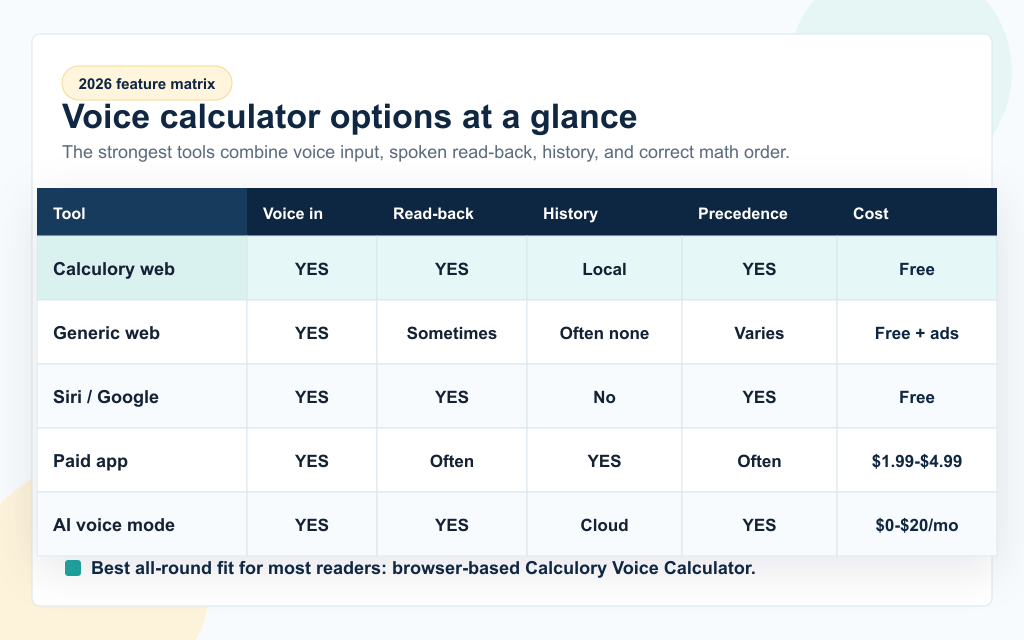
A feature matrix comparing voice calculator options in 2026 across voice input, read-back, history, operator precedence, and cost.

Here is the full feature matrix across the categories covered above. Use it to pick a tool based on what matters most to you.

Tool / CategoryVoice inRead-backHistoryOperator precedenceOfflineCost
Calculory Voice Calculator (web)YesYesLocal, 20 itemsYesPartialFree
Generic web voice calculatorYesSometimesOften noneVariesNoFree with ads
Apple SiriYesYesNoYesYes (recent devices)Free
Google AssistantYesYesNoYesYes (Pixel 6+)Free
Free App Store calculator appYesSometimesSometimesVariesSometimesFree with ads
Paid App Store calculator appYesOftenYesYesOften$1.99 to $4.99
Microsoft Voice Access (Win 11)YesSystem TTSVia Calc appYesYesFree (built in)
Physical talking calculatorNo (button input)YesNoLimitedYes$15 to $60
AI voice mode (ChatGPT, Gemini, Claude)YesYesYes (cloud)Yes (with reasoning)NoFree tier or $20/mo

Three patterns jump out from this matrix:

  1. 1.Read-back is the most common gap. A surprising number of apps and tools take voice input but display the answer silently, which defeats the hands-free promise.
  2. 2.History is the second most common gap. Assistants like Siri and Google Assistant treat each query as one-shot and offer no scrollable record.
  3. 3.Cost differences are mostly cosmetic. The free options cover the same core operations as the paid ones for everyday math.

How to choose: a decision framework for 2026

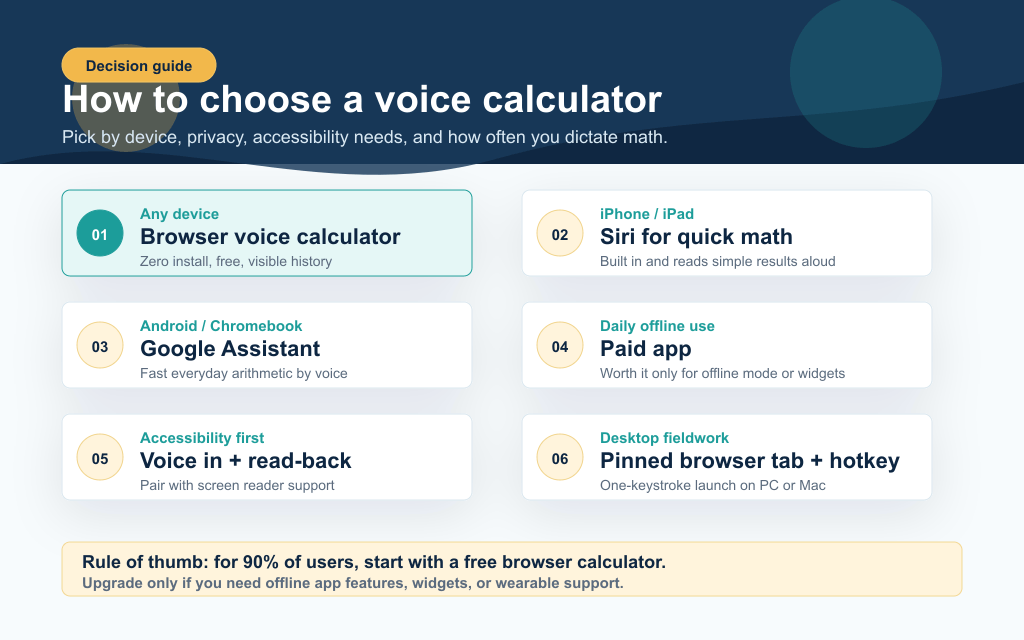
A decision framework showing which voice calculator to choose by device, offline needs, accessibility requirements, and desktop fieldwork.

There is no universal best voice calculator. The right pick depends on your device, your frequency of use, and your privacy preferences. Use this framework to narrow the field in under a minute.

Decision tree

Your situationBest pickWhy
Occasional voice math, any deviceBrowser-based Voice CalculatorZero install, works everywhere
iPhone or iPad, quick arithmeticSiriAlready there, no setup
Android, quick arithmeticGoogle AssistantOn-device on Pixel 6+, no audio uploaded
Daily voice math, want offline supportPaid App Store / Play Store appOffline mode and no ads justify the $4.99
Accessibility primary use caseBrowser tool with read-back AND screen readerCombines voice output with visual feedback
PC user, hands-busy fieldworkPinned browser tab + hotkeyOne-keystroke launch, cross-machine
Classroom or no-internet accessibilityPhysical talking calculatorChip-level speech, no Wi-Fi or microphone needed
Multi-step or symbolic mathBrowser tool, then a dedicated calculatorVoice for fast input, keypad for refinement

Privacy considerations

If privacy matters, prefer tools that process speech on-device. In 2026, that means:

  1. 1.On-device first: Recent Apple and Google devices (iPhone 12+, Pixel 6+) handle short voice queries locally without uploading audio.
  2. 2.Browser tools: Speech is processed by the OS or browser vendor, not by the website you are visiting. Calculory's Voice Calculator page never receives your audio; it only sees the transcribed text.
  3. 3.Avoid free apps with vague privacy policies. If a free app makes money through ads or data sales, your usage patterns are likely the product.

When to switch from voice to keypad

Voice is fastest for short, single-line equations. For multi-step problems, fractions you want to keep symbolic, or anything involving variables, switch to a typed input. The Fraction Calculator keeps results in fractional form. The Scientific Calculator handles trig, logs, and parenthesised expressions cleanly. And the Percentage Calculator is faster than dictation for repeated percent calculations on the same base number.

The takeaway: For 90% of voice math users, the right answer in 2026 is a browser-based voice calculator pinned as a tab or installed as a Progressive Web App. Try the Calculory Voice Calculator for free, then upgrade to a paid app only if you need offline mode or a wearable widget.

Frequently Asked Questions

What is the best free voice calculator online?

Calculory's Voice Calculator is the strongest free browser-based option in 2026 because it combines voice input, text-to-speech read-back, operator precedence, and locally stored history with no account required. It works in Chrome, Edge, and Safari on desktop and mobile. For users who only need quick arithmetic, Apple Siri and Google Assistant are also free and require no setup.

How do I dictate math on my iPhone?

Hold the side button or say 'Hey Siri', then speak your equation, for example 'What is twelve times five plus ten?' Siri displays the result and reads it aloud. For chained calculations or anything you want to see parsed step by step, open Safari and use a browser-based voice calculator like Calculory's free tool, which keeps a visible history of every result.

Can Google Assistant solve math problems?

Yes. Google Assistant handles addition, subtraction, multiplication, division, percentages, square roots, exponents, and unit and currency conversion through voice. On Pixel 6 and newer phones it processes the audio on-device. It returns decimal results rather than fractions, so for fraction-specific work use a dedicated fraction calculator instead.

Are voice calculator apps safe to use?

Most reputable apps from the App Store and Google Play are safe, but the category has uneven quality. Check the privacy policy before installing. Free apps that ask for unnecessary permissions (contacts, location, full storage access) are red flags. If privacy is a priority, use a browser-based voice calculator: the website never receives your audio, only the transcribed text.

Is there a voice calculator for PC?

Yes. The simplest option on Windows, Mac, or Linux is a browser tab pointed at a voice calculator. Pin the tab and bind it to a keyboard shortcut for instant access. Windows 11 also includes Voice Access for system-level voice control, which can dictate into the built-in Calculator app, though it is less polished than a purpose-built voice calculator. Chromebooks get Google Assistant by default.

Why does the calculator say 'one hundred and twelve' is 112 instead of 100 plus 12?

Because 'one hundred and twelve' is a single number (112) in everyday English, not two numbers being added. Most well-designed voice calculators treat the word 'and' as part of a number rather than as the addition operator. To add two numbers explicitly, say 'plus' or 'add'. For example, 'one hundred plus twelve' returns 112, while 'one hundred and twelve' also returns 112 (interpreted as a single number).

Is ChatGPT a good voice calculator?

ChatGPT voice mode is excellent for math word problems, comparisons, and explanations because it can carry a back-and-forth conversation and walk through the reasoning. It is unreliable for long numerical chains because the model can hallucinate digits, so for arithmetic that has to be exact (taxes, payroll, dosing) use a deterministic voice calculator like Calculory's free tool, Siri, or Google Assistant instead. The same trade-off applies to Gemini, Claude, and Perplexity voice modes.

Which voice calculator is best for accessibility?

For low-vision users, the strongest combination is a tool that does both voice input AND voice output (read-back), paired with the operating system's screen reader (VoiceOver on Apple, TalkBack on Android, NVDA or Narrator on Windows). Calculory's Voice Calculator was built with this combination in mind: results are read aloud automatically and the on-screen result card uses an aria-live region so screen readers announce updates.

Author Spotlight

The Calculory Team

Calculator and Productivity Tools Analysts

We benchmark free calculation and productivity tools across web, mobile, and desktop platforms, with a focus on accessibility and privacy.

Verified Expert Educator
best voice calculatorvoice calculator onlinevoice calculator appvoice calculator pcvoice calculator iphonevoice calculator androidvoice activated calculatordictate calculatorspeak to calculatorcalculator with speakertalking calculatortext to speech calculator