Maths16 min readUpdated May 8, 2026

Types of Calculators in 2026: A Complete Guide to Choosing the Right One

The Calculory Team

Calculator and Productivity Tools Analysts

Every type of calculator explained: basic, desk, scientific, graphing, printing, financial, construction (Sonic Cal style), online, app, and voice. Pick the right one in under a minute.

Types of Calculators in 2026: A Complete Guide to Choosing the Right One

Key Takeaways

  • There are 11 distinct calculator categories in 2026, from the basic 4-function unit to construction trade calculators like the Calculated Industries Construction Master Pro (often searched as 'Sonic Cal').
  • Most users overpay by buying a scientific or graphing calculator when a free online basic calculator would cover 95% of their needs. Match the calculator to the job, not the other way around.
  • Trade-specific calculators (Construction Master Pro, ConcreteCalc Pro, HeavyCalc Pro, Pipe Trades Pro) handle feet-inch-fraction math that no consumer calculator can do natively.
  • Online calculators have absorbed most of the basic, scientific, financial, and conversion market. Free web tools like Calculory cover dozens of specialized calculations that used to require dedicated hardware.
  • Graphing calculators are still required for high school and college standardized tests in the US (SAT, ACT, AP, IB), but their everyday use outside testing has shrunk to near zero in 2026.
  • Voice and AI calculators are the fastest-growing category. They handle natural-language input that traditional keypad calculators cannot parse, but they should not replace deterministic tools for money-critical math.

The 11 main types of calculators in 2026
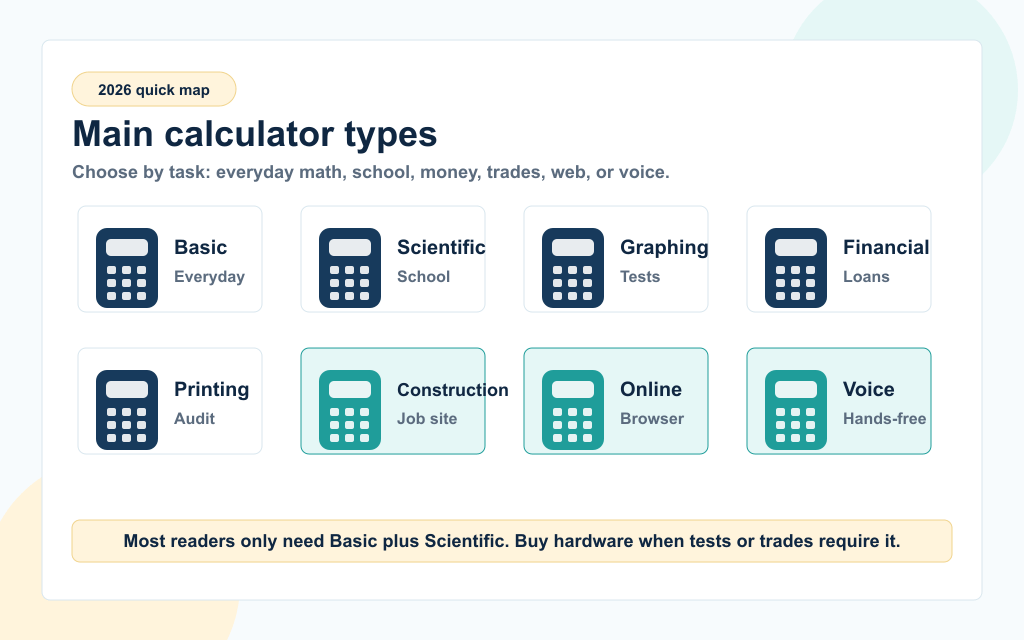
A quick map of the main calculator types in 2026, including basic, scientific, graphing, financial, printing, construction, online, and voice calculators.

A calculator is any tool that computes a numeric answer from an input expression. The original 1960s desktop calculator only handled four operations. Sixty years later, the category has split into 11 distinct types, each tuned for a specific job. Picking the right one saves time, money, and frustration.

Quick reference: every calculator type at a glance

TypeBest forTypical priceWhere it lives
Basic (4-function)Everyday arithmetic, tips, change$5 to $15 USDPocket, drawer, web
DeskOffice work with large display$10 to $40Desktop, accountant office
ScientificTrig, logs, exponents, school math$15 to $30Classroom, engineering desk
GraphingPlotting curves, calculus, exam use$80 to $180High school, college, SAT/ACT
PrintingAudited running totals, accounting$30 to $120Tax office, finance department
FinancialTime value of money, mortgage, IRR$30 to $90Real estate, finance, banking
Construction (Sonic Cal style)Feet-inches-fractions, materials$60 to $130Job site, trades, estimators
Specialty tradePipe, electrical, survey, HVAC$70 to $150Specific trade work
Online (web)Anywhere with a browserFreeCalculory and similar
Mobile appiPhone, Android, tabletFree to $5App Store, Google Play
Voice / AIHands-free or natural language mathFreeBrowser, Siri, Google, ChatGPT

The rest of this guide walks through each category, what it actually does, when to use it, and when a free online tool will replace it. We end with a one-minute decision framework.

Quick start: If you only need one calculator, bookmark Calculory's Basic Online Calculator and Scientific Calculator. Together they cover roughly 95% of what most people ever calculate. Read on for the full breakdown.
Basic calculators (4-function)

A basic calculator handles the four core arithmetic operations: addition, subtraction, multiplication, and division. It is the cheapest, simplest, and most common calculator on Earth. Almost every drawer in every office has one.

What a basic calculator does well

TaskExampleSuitability
Tip on a restaurant bill$48.50 times 0.18Excellent
Quick budgetingAdding monthly billsExcellent
Counting change$20 minus $13.47Excellent
Calculating a square rootSquare root of 144Some models, otherwise no
Trigonometry, logs, exponentssin(30 degrees)No, needs scientific

Many 'basic' calculators include a square root, percentage, and memory keys. These are the only extras most non-technical users ever need.

Why most people no longer buy a physical basic calculator

In 2026 every smartphone, every laptop, and every web browser has a basic calculator built in. The free Basic Online Calculator opens in one click, has unlimited history through your browser, and works on any device you sign into. A $10 desktop unit still has a place if you want a permanent fixture on your desk that doesn't need to be unlocked, but it is no longer the default purchase.

When a physical basic calculator still wins

  1. 1.No-electronics zones: Some classrooms, exam halls, and government offices ban smartphones. A $5 four-function calculator is allowed.
  2. 2.Children learning numbers: Big colorful buttons on a physical unit teach the keypad layout, which then maps to phones and ATMs.
  3. 3.Workshops and kitchens: A wipe-clean physical calculator survives spills better than a phone.

For everyday math online: Calculory's Basic Online Calculator, Percentage Calculator, and Tip Calculator cover the same ground at no cost.

Desk calculators

A desk calculator is a basic calculator scaled up. Larger keys, a larger display, a tilting screen, and a footprint sized to sit on a desk rather than in a pocket. It is the standard tool of accountants, bookkeepers, retail managers, and anyone who runs a lot of arithmetic in a single sitting.

What separates a desk calculator from a basic one

FeatureWhy it matters
10 to 14 digit displayHandles invoice totals and tax bases without scientific notation
Tilting screenReduces neck strain over long sessions
Large rubberized keysFaster touch typing for ten-key data entry
Tax and currency keysOne-button application of a stored tax rate
Cost-sell-margin keysRetail markup math without manual formulas
Dual power (solar plus battery)Always-on without battery anxiety

Common buyers

Desk calculators sell into accounting firms, retail point of sale, school bursaries, manufacturing inventory desks, and home offices. The physical form factor still wins where data entry speed beats software flexibility. A trained ten-key operator can punch numbers faster on a Casio JS-40B than on a laptop keyboard or phone screen.

When to skip the desk unit and use a web tool

If your work involves saving the calculation, sharing it, or feeding it into a spreadsheet, a desktop calculator app or web tool wins. The Markup Calculator, Profit Margin Calculator, and Sales Tax Calculator replace the dedicated keys on a retail desk calculator and produce a copy-pasteable result.

Bottom line: Buy a desk calculator if you do high-volume manual arithmetic at a fixed station. Skip it if your math ends up in a spreadsheet anyway.

Scientific calculators

A scientific calculator extends the basic four operations with the functions every high school and college math student needs: trigonometry, logarithms, exponents, square roots, factorials, and scientific notation. It is the calculator most students carry through Algebra II, Trigonometry, Pre-Calculus, Physics, and Chemistry.

Core scientific calculator functions

Function familyExamplesUsed in
Trigonometrysin, cos, tan, asin, acos, atanGeometry, physics, surveying
Logarithmslog (base 10), ln (natural log)Chemistry pH, decibels, finance
Exponents and rootsx squared, x to the y, n-th rootCompound interest, physics
Scientific notationEXP or EE key, 1.6 x 10 to the 19Physics, chemistry, engineering
Permutations and combinationsnPr, nCr, factorialProbability, statistics
ConstantsPi, e, Avogadro's numberGeometry, calculus, physics

Best-selling models in 2026

The Casio FX-991EX (and its newer FX-991CW) remains the most popular scientific calculator worldwide. The Texas Instruments TI-30X Pro MathPrint and the Sharp EL-W516XG cover the same ground. All three are allowed on most standardized tests including SAT, ACT, IB, GCSE, and A-Level. Always check the latest test rules before relying on a specific model.

Why a free online scientific calculator is enough for most adults

The physical scientific calculator is mandatory in classrooms because exam boards ban phones. Outside of school, most adults rarely calculate sin(30) or log(100). A free Scientific Calculator on the web covers every function the FX-991EX exposes, plus a copy-paste-friendly history and no battery to die. For specific scientific tasks, Calculory has dedicated tools like the Exponent Calculator, Logarithm Change of Base Calculator, and Significant Figures Multiplication Calculator.

Bottom line: Buy a scientific calculator if a teacher requires it or if your job is sit-down engineering math without a computer. Otherwise, the web is faster and free.

Graphing calculators

A graphing calculator plots functions, solves systems of equations, and runs small programs. It is the largest, heaviest, and most expensive consumer calculator category, and it has the narrowest justified use case in 2026: standardized testing.

What a graphing calculator does that scientific does not

CapabilityUse case
Plotting curves on a screenVisualizing y = x squared minus 4
Solving systems of equationsTwo equations, two unknowns, in one keypress
Statistics and regressionBuilding a line of best fit on a data set
ProgrammingCustom routines for chemistry titration, calculus drills
Computer Algebra System (CAS) on some modelsExact symbolic results, factoring, expanding
Connecting to lab probesLogging temperature, pH, voltage in physics class

The two market leaders

The Texas Instruments TI-84 Plus CE remains the dominant graphing calculator in US high schools. The Casio FX-CG50 (called PRIZM in some regions) is the strongest non-TI alternative and tends to be cheaper. CAS-equipped models include the TI-Nspire CX II CAS and the Casio ClassPad. CAS calculators are banned on the SAT and ACT, so check the rules for your test before buying.

Why graphing calculators are losing share

Outside of the testing requirement, almost nothing a graphing calculator does in 2026 is faster than doing it on a phone, tablet, or laptop. Free tools like Desmos, GeoGebra, and Calculory's Algebra Graphing Calculator and 3D Graphing Calculator plot curves more clearly, on a bigger screen, in color, with pinch-to-zoom and shareable links. The remaining justification for the physical unit is the SAT, ACT, AP, and IB exam rules, which still allow specific TI and Casio models.

When to buy a graphing calculator

  1. 1.Your school requires a specific model. Don't argue, buy the model on the list.
  2. 2.You will take SAT, ACT, AP, or IB exams in the next two years. A TI-84 Plus CE is a safe long-term purchase.
  3. 3.You are an engineering student in a no-laptop classroom. Some programs still ban laptops in lectures.

If none of these apply, a free Algebra Graphing Calculator on the web will plot anything you need.

Bottom line: Graphing calculators are a testing-rule purchase, not a math-tool purchase. Match the model to the exam and use a web tool the rest of the time.

Printing calculators

A printing calculator, also known as an adding machine, has a roll of paper tape that prints every keystroke and result. Accountants and tax professionals use it to create an audited running total they can attach to a tax return, an invoice, or an internal review.

Why the paper trail still matters

Audit reasonWhy a printing calculator helps
Tax filingThe taped tape becomes part of the working papers
Internal reviewA second person can re-read the tape without re-keying
Invoice cross-checkLong lists of line items are checked twice
Bank reconciliationAdds and subtracts entries from a statement, with an attached record

The Grand Total key is the signature feature: it sums multiple sub-totals into a single annual or final figure. Tax preparers use it daily during filing season.

Best-known models

The Sharp EL-1801V and the Canon P23-DHV-3 are the everyday workhorses. Higher-end units with two-color tape (black for positives, red for negatives) include the Sharp EL-2630P and the Casio HR-170RC.

Online substitutes

A modern accounting software session in QuickBooks, Xero, or Excel produces an audit trail automatically. For most small operations, a Profit Margin Calculator or Sales Tax Calculator plus a printable PDF replaces the tape. The physical printing calculator survives mostly in established tax practices where the workflow has been the same for decades.

Bottom line: Useful in tax practices, accounting firms, and audited environments. Replaceable everywhere else.

Financial calculators

A financial calculator solves the time value of money. Given any four of {present value, future value, payment, interest rate, number of periods}, it solves for the fifth. Real estate agents, mortgage brokers, finance students, and CFA candidates rely on these for a living.

Core financial calculator functions

FunctionReal-world question
PV (present value)How much should I pay today for $X in N years?
FV (future value)How much will $X grow to in N years?
PMT (payment)What is my monthly mortgage payment?
I/Y (interest rate)What rate makes these cashflows balance?
N (number of periods)How long until I pay off this loan?
NPV (net present value)Is this investment worth pursuing?
IRR (internal rate of return)What is the project's effective return rate?
AmortizationHow is each payment split between interest and principal?

Best-known models

The HP 12C is a 1981 design that is still sold new in 2026. The HP 12C Platinum, the Texas Instruments BA II Plus (and BA II Plus Professional), and the Sharp EL-738FB are the dominant alternatives. The CFA Institute and many MBA programs only allow specific models on exams; check the current list before purchasing.

Online substitutes

For consumer finance questions, the web has caught up. Calculory's Mortgage Calculator, Loan Calculator, Compound Interest Calculator, Simple Interest Calculator, Loan EMI Calculator, and Offset Mortgage Calculator cover most retail finance scenarios with a clearer interface and built-in amortization charts.

Bottom line: Buy a financial calculator if you sit a finance certification exam or you're a real-estate professional running quotes all day. For one-off mortgage and savings questions, the web is faster.

Construction calculators (the 'Sonic Cal' family and similar)

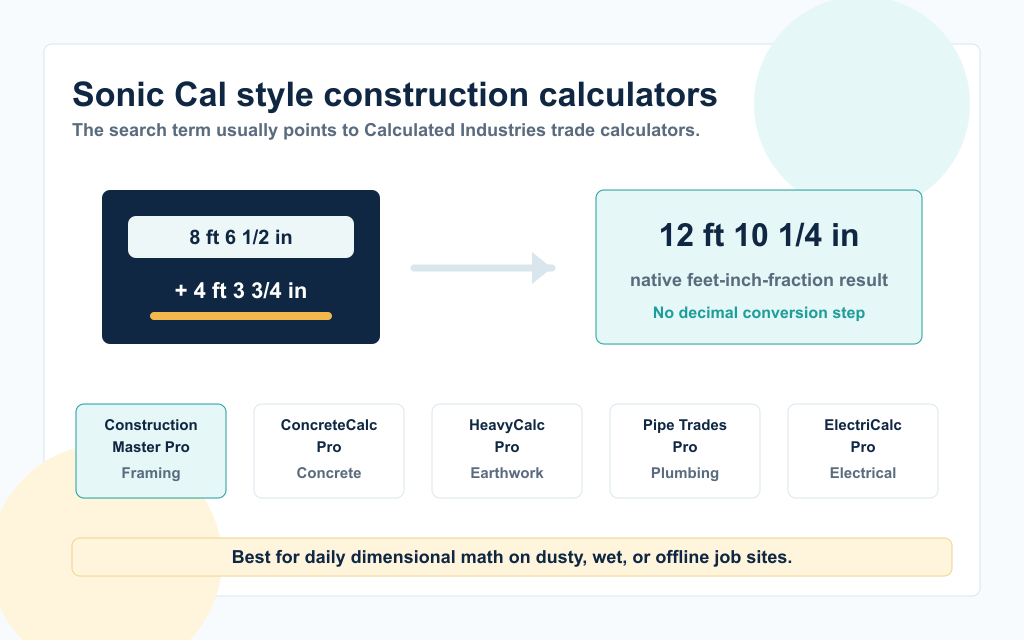
A construction calculator visual showing feet-inch-fraction math returning 12 feet 10 and 1/4 inches, plus the main Calculated Industries trade calculator lineup.

When tradespeople search for 'Sonic Cal', 'sonic calculator', or 'construction master calculator', they almost always mean the Calculated Industries Construction Master Pro and its siblings. These are calculators tuned to the way construction trades actually do math: in feet, inches, and fractions, with automatic conversion between metric and imperial, plus dedicated keys for materials.

What makes a construction calculator different

A standard scientific calculator cannot natively add 8 feet 6 and 1/2 inches plus 4 feet 3 and 3/4 inches and return 12 feet 10 and 1/4 inches. A construction calculator can, with a single key for each unit. This single feature saves hours per week on a job site.

FeatureWhy it matters on the job
Feet-inch-fraction mathNative dimensional arithmetic without converting to decimals
Imperial and metric in one keystrokeWorking a mixed-spec job without errors
Roof pitch, rafter, hip, and valley keysFraming layout in seconds
Stair layout (rise, run, riser height)Code-compliant stair design on the truck
Concrete volume in cubic yardsOrdering ready-mix without overpaying
Drywall, tile, and paint coverageMaterial take-offs at a glance

The Calculated Industries lineup

The phrase 'Sonic Cal' is informal, not a brand. The actual market is dominated by Calculated Industries (CI). The lineup most people are searching for:

ModelBest forApprox. price
Construction Master Pro (4080 / 44080)General contractors, framers, roofers$70 to $100
Construction Master 5 (4050)Lighter version of the Pro for smaller jobs$45 to $65
ConcreteCalc Pro (4225)Concrete, rebar, ready-mix orders$70 to $100
HeavyCalc Pro (4325)Excavation, earthwork, cubic yards$70 to $100
Material Estimator (4019)Quick on-site take-offs$30 to $45
Pipe Trades Pro (4095)Plumbers, pipefitters, mechanical$80 to $110
ElectriCalc Pro (5070)Electricians, NEC code calculations$90 to $120

App alternatives

The BuildCalc app and the official Construction Master Pro app run the same logic on iOS and Android. Handyman Calculator (free) covers a slice of the same features for casual DIY users. For occasional dimensional math, Calculory's Fraction Calculator, Decimal to Fraction Calculator, and Mixed Number to Decimal Calculator handle the conversion piece, though without the trade-specific keys.

When to buy a physical construction calculator

  1. 1.You measure in feet-inch-fractions every day. A physical unit pays for itself in time saved within two weeks.
  2. 2.Your job site is dusty, cold, or wet. Physical units survive conditions that kill phones.
  3. 3.Battery life matters more than features. A construction calculator runs for years on a single button cell.

If your dimensional math is occasional, an app or web tool is enough.

Bottom line: This is the one category where the physical hardware still clearly beats the free web option. If you frame, pour, plumb, or wire for a living, buy the right Calculated Industries model and skip the apps.

Specialty trade calculators

Beyond the construction family, every trade has its own niche calculator. These are tools sold to one specific job description, with keys and presets that no general-purpose calculator includes.

Trade-by-trade quick guide

TradeCalculatorSpecialty math
Plumbing and pipefittingPipe Trades Pro (4095)Pipe offsets, slope, rolling offsets, pressure drop
ElectricalElectriCalc Pro (5070)NEC code, wire sizing, voltage drop, conduit fill
HVACHVAC Pro (4080) plus duct calculatorsBTU sizing, duct CFM, refrigerant charge
SurveyingHP 35s, scientific with COGO programsBearing-distance, traverse, area
Real estate appraisalReal Estate Master IIIx (3405)Qualifying ratios, P and I, PMI, taxes, insurance
Trucking and logisticsTrucker's TripMasterPer-mile cost, fuel surcharge, lump-sum splits
Land and ranchLand MeasureAcreage, perimeter, fence runs
Sewing and patternmakingSewing Calculator (Calculated Industries 8506)Yardage from pattern dimensions

How to know if you need a specialty calculator

If you find yourself running the same conversion or formula five or more times a week, the trade calculator pays for itself in dollars and minutes. If your trade math is occasional, a general scientific calculator plus a free web tool is enough. Calculory's Fuel Consumption Calculator, BTU Calculator, and Currency Converter handle several of the trade-adjacent calculations without buying hardware.

Bottom line: A specialty calculator is a productivity purchase, not a calculation purchase. The math is doable on a phone. The keys save you the steps of looking up which math to do.

Online calculators (web)

An online calculator is a calculator that runs in a web browser. There is nothing to install, nothing to buy, and nothing to update. It is the largest and fastest-growing calculator category in 2026, because the web has absorbed almost every job that physical calculators used to do.

What online calculators cover

What you give up when you go web-only

  1. 1.Offline access. A flaky job-site Wi-Fi connection breaks a web calculator, but not a hardware unit.
  2. 2.Single-purpose ergonomics. A real keypad with raised keys is faster for ten-key entry than a touchscreen.
  3. 3.Test compliance. No web tool is allowed in standardized exams.

For anyone who is online most of the day and not sitting an exam, these limits are minor. The upside (free, instant, always up to date, history saved, shareable) is large.

Bottom line: The web has replaced the basic, scientific, financial, and conversion calculator markets for most casual users. The physical units survive in trades, classrooms, and audit-heavy professions.

Calculator apps for iPhone, Android, and tablets

Every smartphone ships with a built-in calculator. The iPhone Calculator and the Android Calculator both cover basic arithmetic out of the box and unlock scientific functions when you rotate the device or tap a toggle. Beyond the built-in app, the App Store and Google Play offer thousands of dedicated calculator apps, ranging from polished scientific tools to construction and trade-specific apps.

Built-in app capabilities

PlatformAppModes available
iPhone, iPadCalculator (Apple)Basic, Scientific (rotate), Math Notes (Apple Pencil on iPad)
AndroidCalculator (Google)Basic and Scientific via toggle
iPadCalculator with Math NotesHandwriting math via Apple Pencil
MacCalculator (Apple)Basic, Scientific, Programmer modes

Best-known third-party apps

PCalc (iOS, Mac) is the long-running power-user calculator with extensive units, conversions, and AppleScript support. CalcKit and HiPER Calc (Android) cover the scientific and graphing space on Android. Photomath (iOS, Android) lets you scan a printed math problem and get a step-by-step solution. The Construction Master Pro app and BuildCalc bring the Calculated Industries trade math onto a phone.

When an app beats a web tool

  1. 1.Offline: Apps work on the subway, on a plane, or on a flaky job site.
  2. 2.Faster cold-start: Tapping an icon is one step. Opening a browser, finding a tab, and waiting for it to load is three.
  3. 3.Wearables and widgets: A widget on the home screen or a watch face has no web equivalent.
  4. 4.Deep platform integration: Voice shortcuts, Siri, Google Assistant intents, Apple Pencil handwriting.

When a web tool beats an app

  1. 1.Cross-device: A web tool works the same on Mac, PC, iPhone, Android, and Linux without separate installs.
  2. 2.No storage cost: Apps add up. Twenty calculator apps eat real space on older phones.
  3. 3.No updates: A web calculator updates itself. Apps need re-downloads and permission re-grants.
  4. 4.No telemetry: Free apps often monetize through analytics. A web page sees only what you type.

Bottom line: For phone-only quick math, the built-in app is enough. For specialty math, a focused app or a web tool wins. Don't install ten calculator apps, you only need one or two.

Voice calculators and AI math assistants

Voice and AI calculators are the newest category. They take spoken or natural-language input and return an answer through text or speech. This is a fundamentally different interface from a keypad, and it solves a different problem: hands-free or context-rich math.

The four voice and AI calculator paths

PathExampleBest for
Browser voice calculatorCalculory Voice CalculatorHands-free math with operator precedence and read-back
System voice assistantSiri, Google Assistant, AlexaQuick arithmetic on whatever device you already have
AI voice modeChatGPT, Gemini, ClaudeWord problems, comparisons, multi-step reasoning
Calculator with speaker (talking)Hardware unit for accessibilityClassrooms with no internet, low-vision users

When to use voice over keypad

Voice wins when your hands are busy (cooking, fieldwork, driving), when you need accessibility support for low vision, or when the math is part of a question that needs explanation. Voice loses when the math has to be exact (taxes, dosing, payroll) and the natural-language parser might mishear a digit.

For a deeper comparison of every voice option (browser, Siri, Google Assistant, ChatGPT, talking calculators, dedicated apps), read the full guide on the Best Voice Calculators in 2026.

Bottom line: Voice and AI calculators are useful additions, not replacements. Keep a deterministic tool for money math and use voice or AI for hands-free arithmetic and word problems.

How to choose the right calculator: a 60-second decision framework

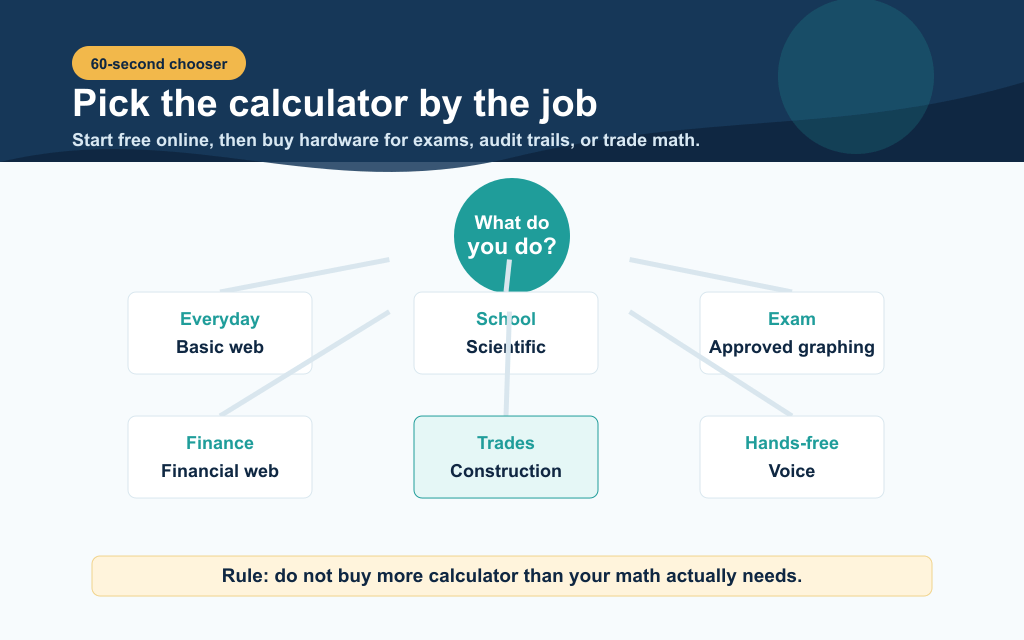
A 60-second calculator chooser that maps everyday math, school, exams, finance, trades, and hands-free needs to the best calculator type.

There is no single best calculator. The right answer depends on what you do with numbers most days, where you do that math, and how often the answer has to be exact.

Decision tree

Your situationBest pick
Occasional everyday math (tip, change, budget)Free Basic Online Calculator
High school or college studentCasio FX-991EX or whatever the teacher requires
Going to take SAT, ACT, AP, or IBTI-84 Plus CE (or program-required model)
Accountant, bookkeeper, tax preparerSharp EL-1801V printing calculator + spreadsheet
Real estate agent, mortgage brokerTexas Instruments BA II Plus + Mortgage Calculator
General contractor, framer, rooferConstruction Master Pro 4080 (the 'Sonic Cal' style)
Plumber, pipefitterPipe Trades Pro 4095
ElectricianElectriCalc Pro 5070
HVAC technicianHVAC Pro plus a duct calculator app
Engineering or science professionalWeb scientific calculator or HP 35s
Hands-free or accessibility userVoice Calculator or talking calculator
Word problems and math helpChatGPT or another AI math solver, then verify

Three rules that save money

  1. 1.Don't buy more calculator than your math needs. A scientific or graphing unit gathers dust if your hardest problem is a percentage tip.
  2. 2.Match the calculator to the test rules, not the syllabus. Schools list the allowed models. Buy from that list.
  3. 3.Use free web tools first, hardware second. If a web calculator solves the problem, buy hardware only when you hit a real limit (offline, exam, ten-key speed, dimensional math).

Where to start on Calculory

If you want one tab to bookmark, pick Calculory's category index at Calculators. If you want a single most-used calculator, the Basic Online Calculator and Percentage Calculator cover most everyday questions, and the Scientific Calculator covers the rest of school and engineering math.

The takeaway: Eleven calculator types exist because eleven different jobs need different keypads. For 90% of readers, two free web tools (basic plus scientific) cover everything they will ever calculate. Buy hardware only when the job clearly requires it: standardized testing, trade dimensional math, or audit-grade tax work.

Frequently Asked Questions

What are the main types of calculators?

There are 11 main types of calculators in 2026: basic (4-function), desk, scientific, graphing, printing, financial, construction (the 'Sonic Cal' family from Calculated Industries), specialty trade (pipe, electrical, HVAC, survey), online web calculators, mobile apps, and voice or AI calculators. The first eight are physical hardware categories, the last three are software.

What is a Sonic Cal calculator?

'Sonic Cal' is an informal term that tradespeople use for construction calculators in the Calculated Industries lineup, especially the Construction Master Pro (model 4080 or 44080). These calculators handle feet-inch-fraction math natively, plus dedicated keys for concrete, rafter pitch, stairs, and other construction tasks. Similar models include the ConcreteCalc Pro (4225), HeavyCalc Pro (4325), Material Estimator (4019), and Pipe Trades Pro (4095).

What is the best calculator type for high school?

For most high school math, a Casio FX-991EX (or FX-991CW) scientific calculator covers Algebra II, Trigonometry, Pre-Calculus, Physics, and Chemistry. Students taking SAT, ACT, AP, or IB exams may also need a graphing calculator, and the safest long-term pick is the TI-84 Plus CE. Always check the current exam rules before buying, because allowed-model lists change.

Do I need a graphing calculator if I have a smartphone?

For day-to-day math, no. Free apps like Desmos and GeoGebra and web tools like Calculory's Algebra Graphing Calculator plot curves more clearly than any handheld unit. The reason to still buy a graphing calculator is testing: SAT, ACT, AP, and IB exams require approved models and ban phones, so you need an exam-approved unit if you sit those tests.

What is the difference between a scientific and a graphing calculator?

A scientific calculator computes single answers for trig, logs, exponents, and statistics. A graphing calculator does all of that plus plots functions on a screen, solves systems of equations, runs programs, and (on CAS models) returns exact symbolic results. Graphing calculators cost two to four times more than scientific calculators and are required in fewer classes.

Are online calculators accurate?

Yes. Reputable online calculators (such as those on Calculory) use the same math libraries as professional engineering and finance software, often more accurate than a $20 hardware calculator because they use higher precision floating point. The accuracy issues with web tools are usually input errors (a misplaced decimal) or model errors (using a tool for the wrong job), not the underlying math.

What calculator do construction workers use?

Most US construction professionals use a Calculated Industries Construction Master Pro (4080 or 44080). Concrete crews often use the ConcreteCalc Pro (4225), excavators use the HeavyCalc Pro (4325), plumbers use the Pipe Trades Pro (4095), and electricians use the ElectriCalc Pro (5070). All of these handle feet-inch-fraction math natively, which is the single biggest reason to use a trade calculator instead of a generic scientific one.

Is a printing calculator still useful in 2026?

Yes, in three settings: tax preparation, accounting firms, and audit-heavy environments. The paper tape provides an audit trail that can be attached to working papers, which is hard to replicate with a screen. Outside those workflows, modern accounting software (QuickBooks, Xero, Excel) has absorbed most of the use case.

What is the best free online calculator?

For day-to-day math, Calculory's Basic Online Calculator and Scientific Calculator cover the same ground as a $20 to $30 physical unit at no cost. For voice input, the Calculory Voice Calculator handles spoken math with operator precedence and read-back. For specialized work, the site has dedicated tools for fractions, percentages, mortgages, statistics, geometry, and more.

Are voice calculators reliable for serious math?

Voice calculators based on a deterministic math engine (like Calculory's Voice Calculator) are reliable for everyday arithmetic. AI voice modes (ChatGPT, Gemini, Claude) can occasionally produce wrong arithmetic on long numerical chains because they are language models, not calculators. For money-critical math (taxes, payroll, dosing), use a deterministic tool and treat AI as a brainstorming layer, not a source of truth.

What calculator is best for accountants?

A printing calculator (Sharp EL-1801V or Canon P23-DHV-3) for the audit trail, plus a spreadsheet for everything that needs to be saved or shared. For mobile work, an HP 12C financial calculator or its app version handles time-value-of-money questions. The web replaces most of the rest, with calculators like the Profit Margin Calculator, Sales Tax Calculator, and Compound Interest Calculator on Calculory.

Author Spotlight

The Calculory Team

Calculator and Productivity Tools Analysts

We benchmark free calculation and productivity tools across web, mobile, and desktop platforms, with a focus on accessibility, classroom use, and trade workflows.

Verified Expert Educator
types of calculatorscalculator typesbasic calculatorscientific calculatorgraphing calculatorprinting calculatorfinancial calculatorconstruction calculatorsonic calculatorconstruction master procalculator types and useshow to choose a calculatoronline calculator typesspecialty trade calculator